
Raycast AI alternative for Mac
Raycast AI Alternative for Mac:Vinaa vs Raycast AI
Vinaa is a Raycast AI alternative for Mac users who want a dedicated workspace for chatting with cloud and local models. It does not replace Raycast's launcher or its other productivity tools.
Compared and source-checked 13 September 2026
The short answer
Choose based on how you use AI.
Choose Vinaa if
You want a focused, native AI chat workspace
Vinaa is the better fit if you want a product focused entirely on AI chat. It combines deeper organization and model choice with a fully native Mac experience, direct provider connections, local-first storage, optional private iCloud sync, and one-time pricing.
Choose Raycast AI if
You want AI with other Mac productivity features
Raycast AI is the better fit when you also want a launcher, clipboard history, notes, calendar access, browser context, extensions, and system actions built into the same product.
Is Vinaa a complete Raycast replacement? No. Vinaa can replace the Raycast AI chat workflow when you want more conversation organization, direct provider connections, or local models. It does not replace Raycast's launcher, clipboard history, notes, calendar, window management, or extension ecosystem. This page compares Vinaa with Raycast's AI layer and includes the wider Raycast features that directly improve that workflow.
Side by side
Vinaa and Raycast AI solve different versions of the problem.
| What matters | Vinaa | Raycast AI |
|---|---|---|
| Primary job | Chat with cloud and local AI models in an organized workspace | AI plus a launcher and other productivity features |
| Chat organization | Projects, nested folders, project defaults, favorites, search, multiple windows and tabs | Folders, pinned and recent chats, archive, search, chat branches, and Projects with memory and files |
| System context and actions | Files, provider web search, apps and services connected through MCP, and project-level tool defaults | Built-in notes, clipboard, calendar, browser, selected text, screen, terminal, extensions, and MCP |
| Cloud models | Use your own keys for OpenAI, Anthropic, Google, and other supported providers | Monthly AI Credits on paid plans, plus supported API keys and Claude or ChatGPT subscriptions |
| Local models | Ollama and LM Studio available now | Ollama, with a paid Raycast plan required |
| BYOK request path | Direct from your Mac to the provider you select | Anthropic, Google, and OpenAI traffic goes through Raycast servers; OpenRouter is direct |
| Chat storage and sync | Stored on your Mac; optional sync through your private iCloud account | Local-first; optional Cloud Sync stores encrypted chats in Raycast's backend |
| Mac implementation | SwiftUI, AppKit, and Rust, without a WebView interface | Native host with a React interface in a system WebView, plus Node and Rust in v2 |
| Platforms | macOS 15+, on Intel and Apple silicon | Mac, Windows, and iOS |
| Payment model | One-time lifetime licence | Pro from $8 monthly when billed annually, with 500 credits; higher-credit Pro+ and Max plans; paid plan also required for BYOK |
Conversation organization
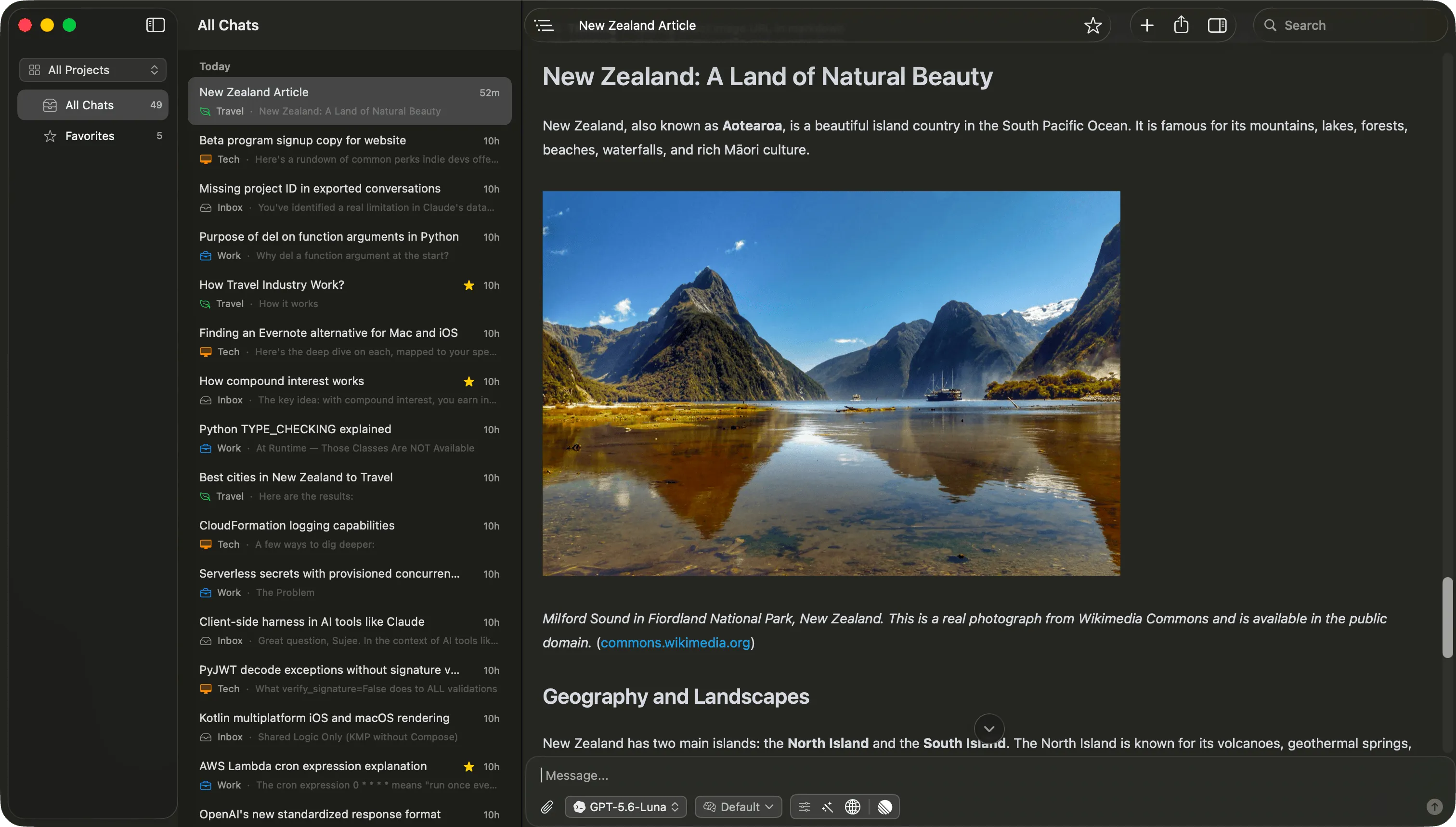
Vinaa provides more ways to organize and continue chats.
Raycast AI Chat is no longer a bare prompt box. It has persistent history, folders, pinned and recent views, archive, search, and branching. In September 2026, Raycast also added Projects that keep related chats, memory, and files together. That is enough organization for many people.
Vinaa is designed for larger bodies of conversation. You can arrange chats in projects and nested folders, set project-level models, prompts, and tools, keep several chats open in windows and tabs, and navigate long answers from a conversation outline.
Vinaa can also import ChatGPT and Claude exports. That matters when your useful history already exists somewhere else and you want it in the same organized workspace as new conversations.
Context and actions
Raycast bundles AI with more Mac productivity features.
This is Raycast AI's clearest built-in advantage. Because it lives inside a broader productivity app, a chat can use context from Raycast Notes, Clipboard History, Calendar, browser tabs, the focused window, selected text, a screen or area capture, and installed extensions. It can also use the terminal, AI Extensions, and MCP tools.
Vinaa can also connect AI chats to Mac apps and external services through the appropriate MCP servers. Connected tools can be selected for a chat or saved as project-level tool defaults. Vinaa does not bundle a launcher, clipboard manager, notes app, or calendar interface. It lets you add the app and service connections that are useful to your chats.
The distinction is built-in breadth versus a focused, extensible AI chat app. Raycast includes more non-AI Mac productivity features in the product. Vinaa keeps the product centered on AI chats and extends them through MCP.
Models and BYOK
The model choice is also a billing and routing choice.
Vinaa uses your provider accounts
You add keys for supported cloud providers or connect Ollama and LM Studio. Cloud requests go directly from your Mac to the provider you chose. You pay that provider for usage. Vinaa does not add an AI subscription or proxy the request through a Vinaa AI service.
Raycast combines AI Credits with bring-your-own options
Raycast's paid plans include monthly AI Credits. You can instead connect a supported API key, local model, or Claude or ChatGPT subscription without consuming those credits. A paid Raycast plan is still required, and you separately cover the model usage or external subscription.
Privacy and data path
Both are local-first, but the service boundary is different.
Vinaa stores conversations on your Mac. If you enable sync, supported app data goes through your private iCloud account, and Vinaa cannot access the contents of that private database. API keys live in macOS Keychain. Cloud AI requests go directly to the selected provider. Read the full Vinaa privacy policy for the exceptions created by services you choose, licensing, diagnostics, and optional analytics.
Raycast also describes its product as local-first. Its AI privacy documentation says standard Raycast AI requests use Raycast's secure server infrastructure. It says prompts are not logged or retained except for explicit cases such as Cloud Sync, attachments, and feedback, and that provider agreements prevent model training on inputs and outputs.
If you enable Raycast Cloud Sync, encrypted AI chats are stored in Raycast's backend. Attachments are uploaded to Raycast servers for processing and later access. This is not a claim that Raycast's design is insecure. It is a meaningful difference in who operates the infrastructure that handles or stores your data.
Mac architecture
“Native versus web” needs a more precise answer.
Vinaa
Vinaa's interface is built with SwiftUI and AppKit, with Rust used where it helps. It does not use Electron, Tauri, or a WebView for its interface. That focus gives Vinaa standard Mac controls, shortcuts, windows, and tabs.
Raycast v2
Raycast documents v2 as a hybrid application: a native host on each platform, a React interface inside the operating system's WebView, a long-running Node backend, and shared Rust components. Calling it “just a web app” would be inaccurate.
What Raycast says about memory
In its May 2026 technical deep dive, Raycast reported roughly 200–300 MB for v1 after use and 350–450 MB for the v2 beta in a similar scenario. Raycast said the total depends on features, extensions, and displayed content, and that optimization was continuing.
Those are Raycast's own beta measurements, not a current Vinaa-versus-Raycast benchmark. If memory is decisive for you, compare both apps on your Mac with the extensions, chats, and models you actually use.
Read Raycast's v2 technical deep divePlatform, focus, and price
Breadth and focus lead to different tradeoffs.
Raycast is available on Mac, Windows, and iOS. Vinaa supports macOS 15 and later on Intel and Apple silicon. If you need the same AI tool across Windows and iPhone as well as Mac, Raycast has the clear advantage today.
Vinaa is built by an independent Mac developer. Raycast is a venture-backed company building a broader, cross-platform productivity system. Neither model guarantees a better product. The difference helps explain why Vinaa can focus on the AI chat experience, including model choice, organization, tools, and privacy, while Raycast connects AI to many more parts of a person's computing workflow.
Vinaa offers a one-time lifetime licence. Raycast Pro is $8 monthly billed annually, which is $96 a year, or $10 monthly, and includes 500 AI Credits each month. Higher plans include more credits and models. Raycast Pro also pays for features beyond AI, so it is not an AI-only comparison.
The final choice
Choose Raycast for AI plus other Mac productivity features. Choose Vinaa for an AI chat app you can organize and extend.
Raycast AI is likely better for you if:
- You already rely on Raycast throughout the day.
- You want AI bundled with a launcher, clipboard, notes, calendar, browser context, and extensions.
- You want one productivity system across Mac, Windows, and iOS.
- A subscription and usage credits make sense because you value the rest of Raycast Pro too.
Vinaa is likely better for you if:
- You regularly return to previous chats and organize them by project.
- You want ChatGPT and Claude history in the same app as new chats.
- You want Ollama or LM Studio alongside cloud providers today.
- You want to connect other apps and services through MCP.
- You prefer direct provider routing, private iCloud sync, and one-time pricing.
Sources, disclosure, and update policy
This comparison is published by Vinaa, so Vinaa is not a neutral publisher. Vinaa is not affiliated with Raycast. The goal is to make the product boundary and the tradeoffs checkable, including the areas where Raycast AI is the stronger choice.
Raycast facts were checked against its current AI Chat, privacy and security, BYOK, connected subscriptions, local models, billing, usage limits, AI Extensions, v2, pricing, AI Credits announcement, architecture, Ollama, and Series B pages.
Vinaa facts were checked against the current app and its features, pricing, and privacy pages. We will recheck this comparison when Raycast changes AI Credits, model access, BYOK requirements, pricing, request routing, or its published architecture. Last checked 13 September 2026.