
Alter alternative for Mac
Vinaa vs Alter:Which Mac AI app should you choose?
Vinaa brings everyday AI chat into one Mac app: choose a cloud or local model, start chatting, and keep your conversations organized. Alter combines chat with dictation, meetings, and actions across your apps. Here is how they compare for the tasks you are likely to use every day.
By Sujeevan Nagarajah, Vinaa's developer
Updated 1 November 2026 · Product research 26 October 2026
The short answer
Choose the chat experience and features you need today.
Vinaa
Choose it for the chat experience
Chat with cloud and local AI models, switch models as you continue a conversation, and keep your chats organized and searchable. Reuse saved prompts, connect tools, and optionally sync through your private iCloud account. A one-time licence includes future app updates; paid cloud-model usage is separate.
Alter
Choose it for actions across your Mac
Screen-aware assistance, meeting transcription, dictation, and configurable automations. Its core app is free with your own API keys or local models; paid plans can include managed AI access.
I build Vinaa, and my personal use of Alter has been limited to quick testing. Feature comparisons use official documentation and an interface review. Product preferences are my own.
01 · User experience
My priority: do everyday AI chat well.
Vinaa: build around one core experience
I'm building Vinaa around everyday AI chat. My priority is to make that experience clear, useful, and easy to use, with the familiarity and attention to detail I expect from a Mac app.
As Vinaa gains capabilities such as app context and Computer Use, I want them to fit naturally into the chat experience. New features should help you get things done while keeping the app straightforward to understand and use.
Alter: my impression of its feature breadth
In my brief testing, Alter felt like a product trying to cover almost every AI workflow on the Mac. Its breadth is impressive, but I found the experience harder to understand and navigate than I wanted for everyday chat.
In my view, the drive to add features comes at the expense of a clear, cohesive user experience. Someone who wants a highly configurable assistant may value that breadth; for me, how the features fit together matters just as much as how many there are.
02 · AI chat
How do you want to use AI on your Mac?
Vinaa: one place for your AI conversations
Chat with cloud and local AI models in one app. Ask questions, explore ideas, and work through everyday tasks. Switch models within the same chat as you continue the conversation.
Reuse saved prompts and bring connected tools into a chat when a task needs more than an answer. Keep your conversations organized and searchable so you can find them again and pick up where you left off.
Alter: chat alongside other apps
Use a floating QuickHub panel beside the app you are working in, or the full Hub with its sidebar, tabs, and split panes. Alter can bring the current app's context into a request and turn that request into an action.
Both apps support cloud providers and local models. Alter also offers managed model access through paid plans. Its window and context controls suit work that moves between chat and other Mac apps.
Available today versus planned: Alter already offers app context, screen awareness, and Computer Use. Vinaa plans to add these capabilities. Compare the current chat experience and the features you need now.

Both are native Mac apps; chat rendering differs. Vinaa uses TextKit text controls with a Rust Markdown parser. Alter renders conversations in a WebView. Vinaa's native text layout is designed for performance and a native Mac experience.
03 · Finding and organizing chats
What happens when you need an earlier answer?
Vinaa: projects, folders, and response headings
Keep related conversations in projects and nested folders. For example, put research, drafts, and review chats in separate folders within one client project.
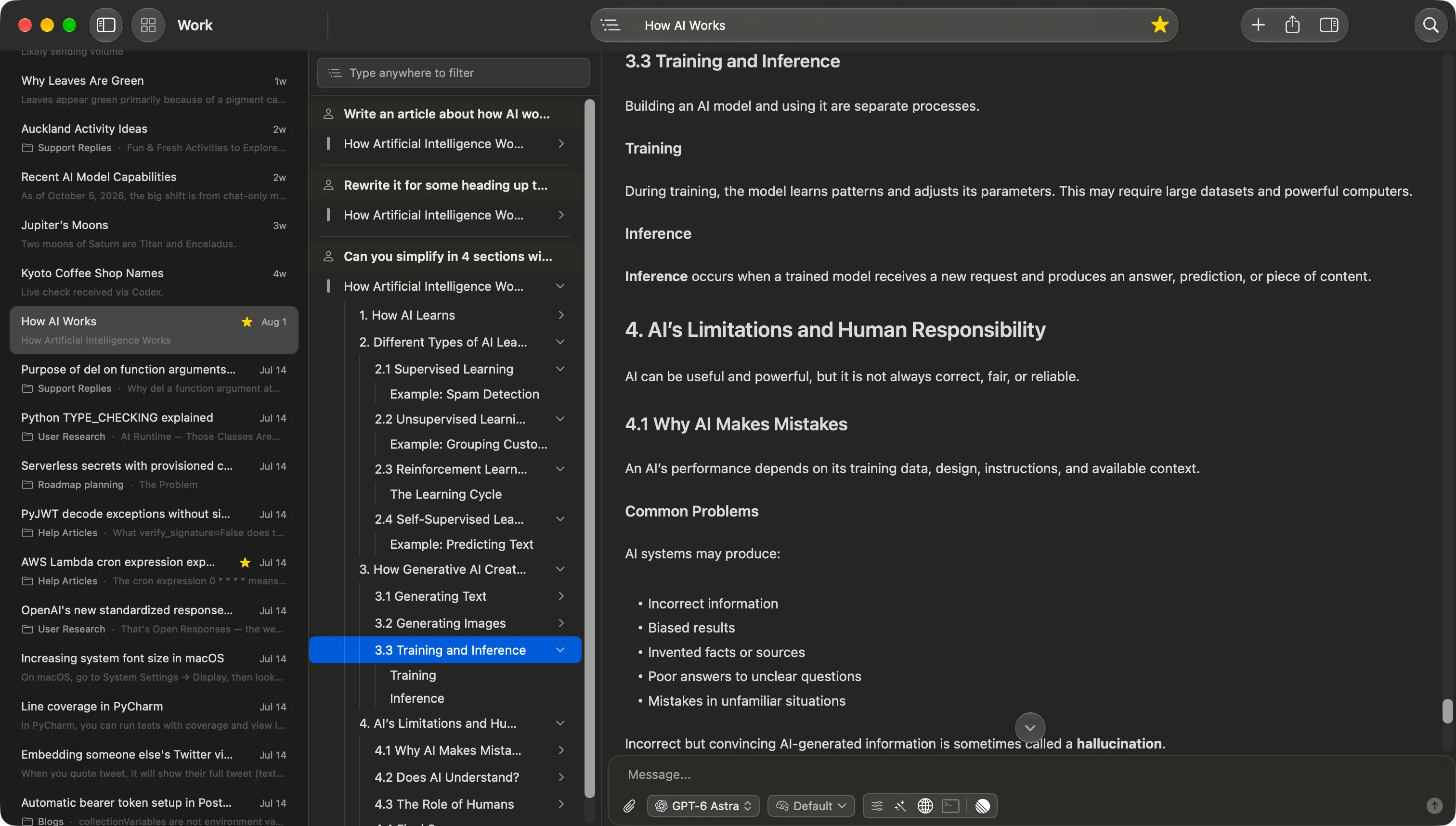
Use full-text search to find a conversation, then open Content Navigation to see its messages and the nested headings within AI answers. You can jump straight to a section of a long response. Find in Chat locates text within the open conversation.
Alter: tags, filters, and a turn index
Organize history with tags and filter by conversation type, Workspace, or Action. Search across saved chats and meeting transcripts, or find text within the current chat.
The Hub's turn index jumps between message exchanges. This is useful for returning to a particular part of a conversation; it is a different navigation level from Vinaa's headings inside individual responses.
The practical difference: Both apps help you find saved chats. Vinaa adds a folder hierarchy for organizing them and a heading outline for navigating long answers.
04 · Tools, MCP, and automation
Both apps use connected tools. Where does Alter offer more today?
Vinaa: tools and MCP inside your chats
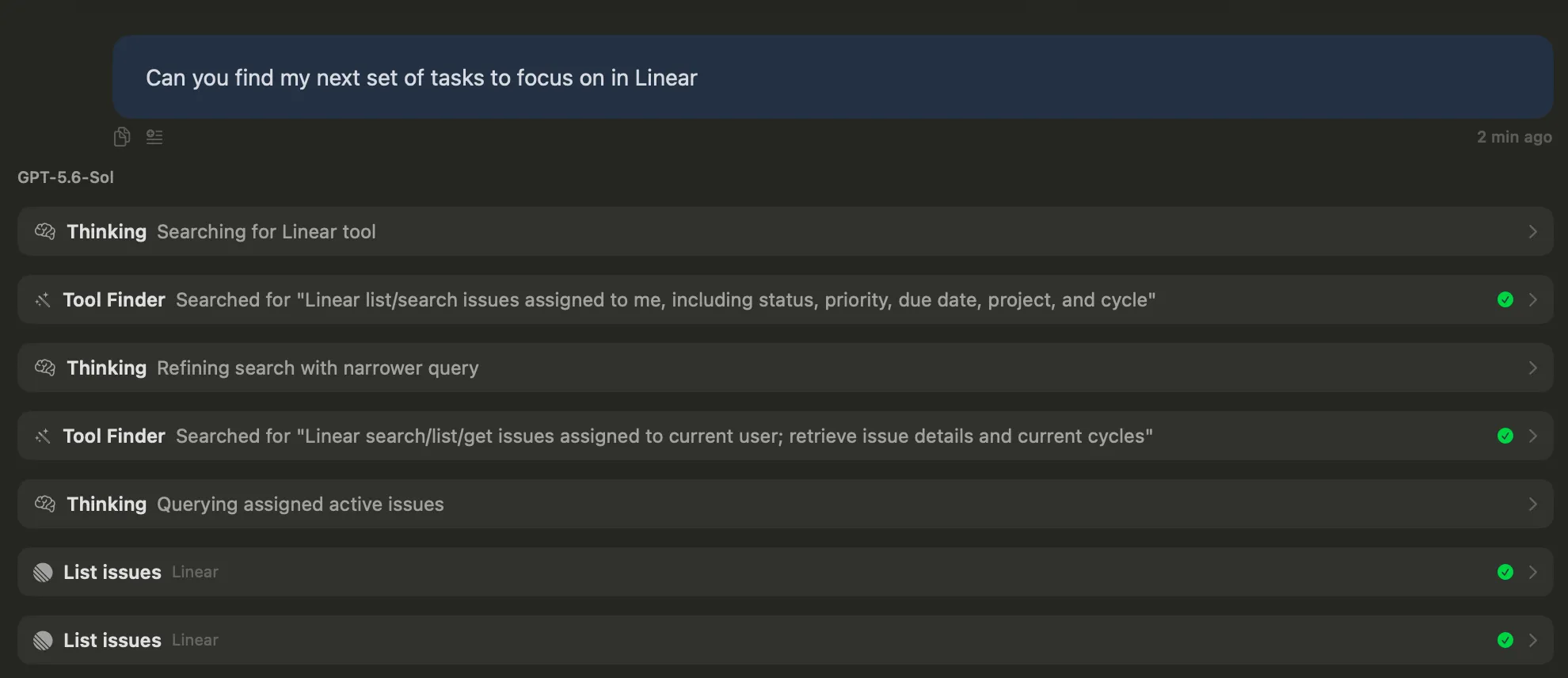
Search the web and connect services through remote MCP. Vinaa can work through tasks with those tools, with Tool Finder loading relevant tools when they are needed.
Choose which tools a chat can use and save defaults for a project. For example, ask Vinaa to find your assigned Linear issues: Tool Finder can locate the relevant tools, then Vinaa uses them to retrieve the information. Available actions depend on the connected service, permissions, and model.
Alter: MCP plus built-in Mac tools and automation
Alter also connects to remote MCP servers and external services. Its Flow tool orchestrator selects tools and handles tasks across them. Custom Actions can combine tools, prompts, models, and schedules.
It adds built-in Mac app tools for apps such as Mail and Calendar, plus app context, screen awareness, and Computer Use. Its Workspaces can also index files and folders for repeated tasks.
The current gap: Both apps can act through connected tools. Alter offers a broader built-in Mac automation toolkit today. Vinaa's local MCP support, app context, screen awareness, Computer Use, and folder-based workflows are planned additions.
05 · Privacy and sync
Will your chat history follow you to another Mac?
Vinaa: local history and optional private iCloud sync
Chats are stored on your Mac. Turn on iCloud sync to keep supported data in sync through your private Apple account. Vinaa does not have access to that private iCloud database or run a separate chat-storage account service. See Vinaa's privacy policy.
Alter: local history with your own backup or transfer
Alter also stores chats, transcripts, and workspace data on your Mac. Its documentation says history is not cloud-synced. Moving it to another Mac requires your own transfer or backup process. Public conversation links share selected chats rather than sync all history.
The practical difference: If you use a MacBook and a desktop Mac, Vinaa's optional iCloud sync lets you continue supported chats across them. Alter's local history needs a separate transfer process.
Local storage and local AI processing are separate choices. In either app, a cloud model or connected tool receives the content needed for its task. iCloud sync does not change the AI provider's data policies.
06 · Pricing
What are you paying for: the app, the models, or both?
Vinaa: pay once for the app and future updates
The launch licence is $40 for one Mac, $70 for two, or $100 for three. It includes future app updates for as long as Vinaa exists. Connect your own AI providers or local model server; paid provider usage is separate.
Alter: a free core app with optional paid services
Use your own API keys or local models with the free plan. Local+ adds advanced local speech models. Pro and Lifetime include managed cloud-model access and other paid services. The free BYOK/local path remains available after the seven-day managed-model trial, with upgrade prompts.
The practical difference: For BYOK or local chat, Alter has the lower app price: free. Vinaa's licence buys its chat experience, private iCloud sync, and ongoing updates. Alter's managed plans include AI usage, so compare those with the total of your Vinaa licence and your provider bills.
What each option buys
| Option | Price | What is included |
|---|---|---|
| Vinaa Lifetime | $40 once: 1 Mac $70 once: 2 Macs $100 once: 3 Macs | Launch prices. App access and all future app updates for the life of Vinaa. Paid AI-provider usage is separate. |
| Alter Free | $0 app fee | Core app using your own API keys or local models. Paid AI-provider usage is separate. Upgrade prompts remain. |
| Alter Local+ | $3.50/month or $29/year | Advanced local speech models. A paid add-on, without the Pro managed-model bundle. |
| Alter Pro | $29/month or $240/year | Managed access to 50+ cloud models, advanced meeting features, remote integrations, and other paid services while subscribed. Fair use applies. |
| Alter Lifetime | $720 once | Pro-level access and future features without recurring subscription billing. Managed AI usage remains subject to fair use. |
USD prices checked 26 October 2026; taxes may apply. Vinaa's planned regular prices are $80/$140/$200 for one/two/three Macs. Check Vinaa pricing and Alter pricing for the current offer and terms. Alter Pro and Lifetime allow multiple installations for one user, with only one device active at a time.
Alter's paid model access is subject to fair use. Its monthly budget can trigger routing to lower-cost models. A Lifetime purchase removes recurring app-plan billing; it does not remove the managed service's fair-use terms.
Which should you choose?
Pick the app that fits the work you need today.
Vinaa is the better fit when
- Your main use is chatting with cloud and local AI models.
- You want full Mac chat windows, project folders, and response-heading navigation.
- You want to continue conversations across Macs through private iCloud sync.
- You prefer a one-time app licence and control over provider spending.
Alter is the better fit when
- You need dictation, meeting transcripts, or screen-aware actions today.
- You want to configure repeatable tasks with tools and schedules.
- You want a free app for your own API keys or local models.
- You prefer paying for managed model access with its fair-use terms.
Side by side
Compare the workflows that matter to you.
| What matters | Vinaa | Alter |
|---|---|---|
| Main focus | Everyday AI chat with cloud and local models | Mac assistant spanning chat, meetings, app context, and automation |
| Chat interface | Main chat windows and native tabs | QuickHub floating chats; full Hub with tabs, sidebar, and split panes |
| Cloud providers with your own keys | Yes; provider usage billed separately | Yes, including the free tier; provider usage billed separately |
| Ollama and LM Studio | Yes | Yes, including the free tier |
| Managed cloud-model access | No Vinaa-managed model bundle | Pro and Lifetime; subject to fair use |
| Model selection | Search, favorites, capability filters, and project defaults | Model picker, managed routers, and per-action model settings |
| History search and find in chat | Full-text chat search and Find in Chat | Search across chats and transcripts; find in the current chat |
| Long-conversation navigation | Message list with nested headings inside AI responses | Turn index for jumping between message exchanges in the Hub |
| Chat organization | Projects, nested folders, favorites, and project defaults | Tags, history filters, and workspace/action associations |
| Reusable instructions | Prompt library with fill-in fields and a preview | Custom Actions with prompts, model choices, tools, and schedules |
| Files | Attachments and a browser for reusing files from earlier chats | File context plus indexed file/folder Workspaces |
| Remote MCP connections | Yes; directory and custom servers | Yes; official server gallery and custom servers |
| Tool selection and discovery | Choose tools per chat; Tool Finder loads tools when needed | Tools Manager and Flow tool orchestration |
| Local history | Stored on your Mac | Stored on your Mac |
| History sync between Macs | Optional sync through your private iCloud account | No cloud history sync; use your own backup or transfer process |
| Chat rendering | Native TextKit text controls with a Rust Markdown parser | WebView conversation rendering within a native Mac app |
| Voice input | Planned: basic voice input | Speech-to-prompt and dictation; speech-model options depend on plan |
| Meeting recording and dedicated meeting AI | Not planned; outside core scope | Built in; advanced speech and speaker features depend on plan |
| Screen awareness | Planned | AppSense screen context |
| App context | Planned | Context from supported Mac apps |
| Computer Use | Planned | Built-in Mac UI automation |
| Saved chat memory | Planned | Local Memory across chats, workspaces, and meetings |
| App payment | One-time lifetime licence with future updates | Free core app, optional Local+, Pro subscription, or Lifetime |
Table updated 1 November 2026; Alter feature research 26 October 2026. Planned features are not available yet. See the public roadmap for progress. Alter's turn index is documented; an equivalent to Vinaa's nested response-heading outline was not verified. Feature and plan requirements apply. Sources: Vinaa features, Alter interface and history, Actions, tool management, Workspaces, local data, and pricing. Scroll the table sideways on smaller screens.
Sources, disclosure, and updates
This comparison is written by Vinaa's developer and published by Vinaa. Vinaa is not affiliated with Alter. Preferences are the author's. Alter research includes its official website, documentation, pricing, changelog, public customer reviews, an interface review, and its official release package for the rendering distinction. No comparative performance benchmark or extended Alter workflow test was conducted.
Vinaa details were checked against its implementation and feature walkthroughs. Screenshots show Vinaa. Customer reports are dated experiences and may describe earlier versions. We review this comparison from time to time as features, prices, and availability change.
Also comparing other Mac AI apps? Read Vinaa vs BoltAI and Vinaa vs Raycast AI.