
BoltAI alternative for Mac
BoltAI Alternative for Mac:Vinaa vs BoltAI
Two native Mac apps for chatting with cloud and local AI models. Vinaa is a new, modern app focused on the everyday chat experience, native Mac controls, and private iCloud sync. BoltAI is an established leader in AI chat for Mac.
By Sujeevan Nagarajah, Vinaa's developer
Source-checked 21 October 2026
The short answer
A choice between two good Mac apps.
Choose Vinaa if
You want powerful AI chat with a polished Mac experience
You want a powerful native Mac app that makes everyday AI chat easy to use, with native text rendering, local storage, private iCloud sync, and a lifetime licence that includes future updates.
Choose BoltAI if
You want more AI tools built in today
You rely on Instant Chat, dictation across Mac apps, inline workflows, multi-agent chats, or built-in image generation. BoltAI also offers mobile access, subject to its current access and licence terms.
Everyday AI chat
A familiar Mac app, from your first message.
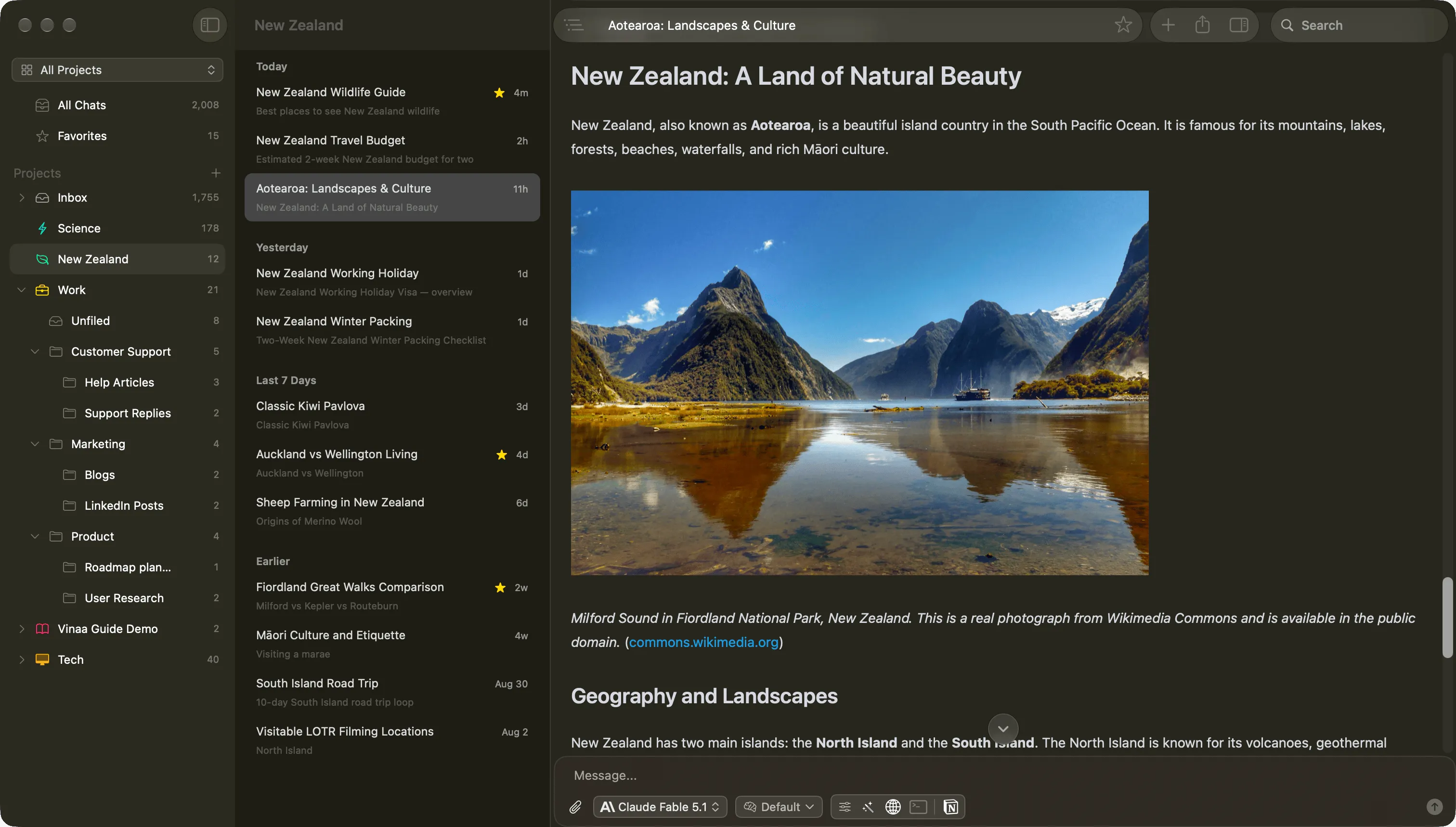
Start a chat, choose a cloud or local model, and send your message. Vinaa brings model choice, reusable prompts, and connected tools into the same interface, with familiar Mac controls, windows, and shortcuts.
As your chats grow, projects and nested folders help you keep related conversations together. Project defaults save your model, instructions, and tools for the next chat.
BoltAI also has substantial project features: shared instructions, models or agents, plugins, and reference files. Its linked-file and folder features can let AI work with files on your Mac.
Vinaa's appeal is how these everyday actions fit together. My aim is to make asking a question, choosing a model, and reading the answer feel straightforward. Try both apps to see which feels more natural to you.
Reading and finding
Jump to a heading in a long answer.
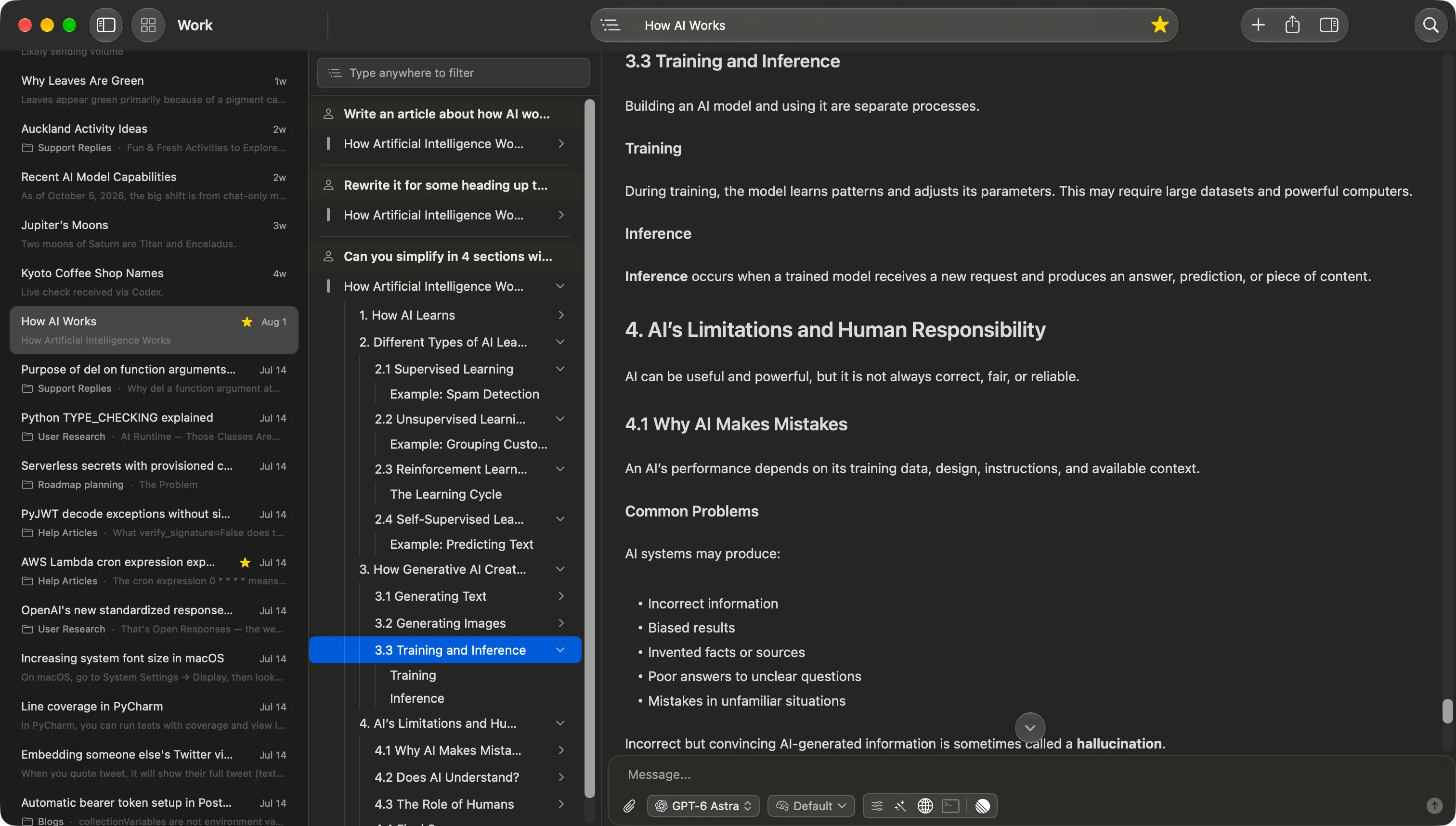
Vinaa's Content Navigation lists the messages in a conversation and the headings inside AI responses. Expand an answer and jump straight to the section you want to read again.
Both apps offer full-text search across your chats. Search in Vinaa to find a conversation by its contents, then use Content Navigation to move through its messages and headings. BoltAI also documents full-text search across chat history.
Prompts, models, and tools
Make repeated tasks easier to start.
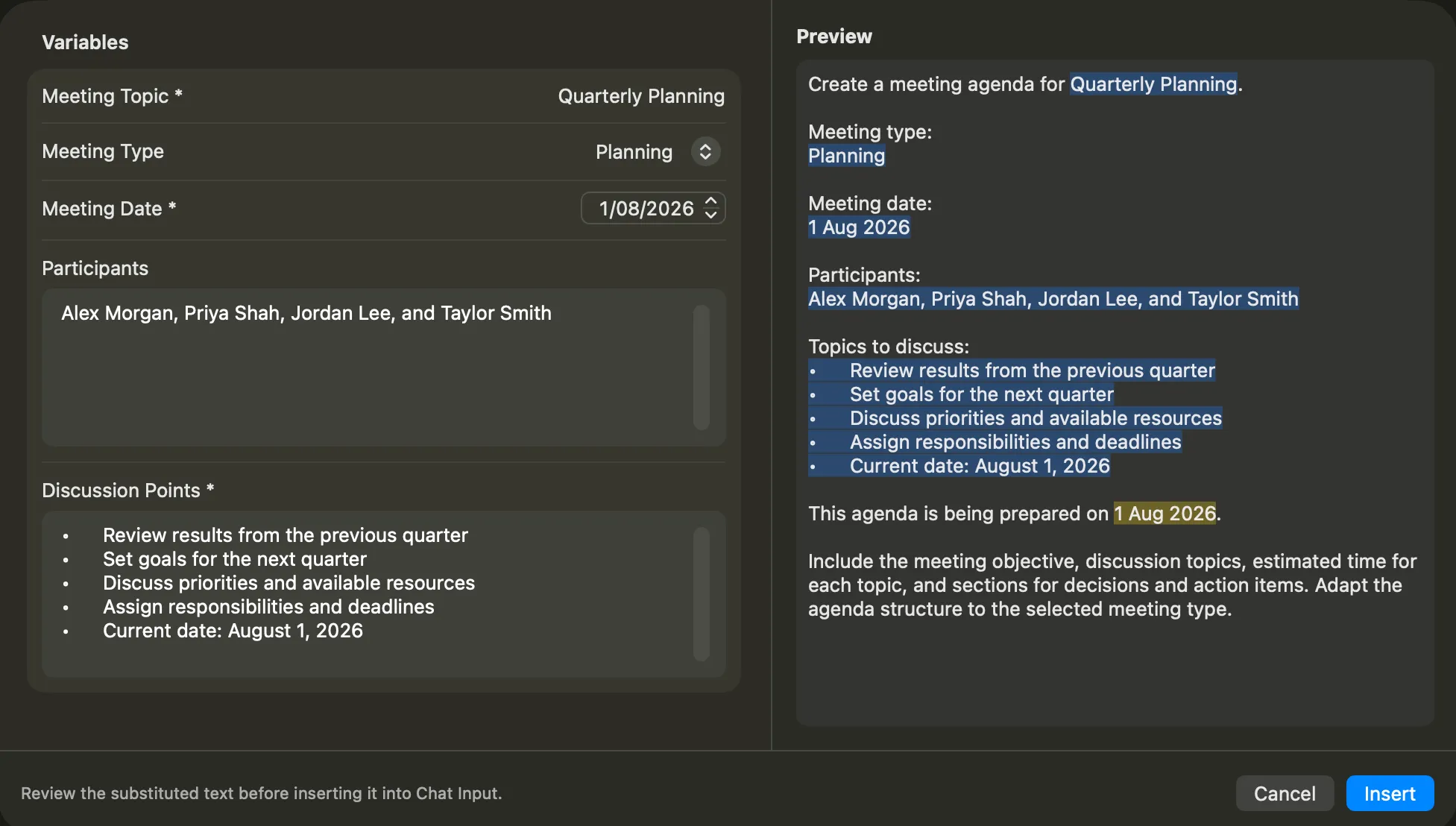
Save a meeting-agenda prompt in Vinaa with fields for the topic, meeting type, date, and participants. Next time, select it from the slash menu, fill in the fields, and preview the completed prompt before inserting it. Templates can belong to the whole app or a project.
BoltAI also has a prompt library and configurable workflow templates. Its current feature documentation still labels Dynamic Variable as coming soon. Vinaa's fill-in prompt templates are available today.
For model choice, Vinaa provides search, favorites, and capability filters in its model picker. Its tool picker lets you select MCP tools and save project defaults. Both apps support model switching and MCP; try the pickers to see which approach suits you.
Native Mac experience
Both are native. Chat rendering differs.
Vinaa uses SwiftUI and AppKit, with TextKit for Markdown text rendering and a Rust parser. Using native text controls gives me direct control over layout and rendering, so I can optimize memory use as conversations grow.
BoltAI is also built with SwiftUI and AppKit. It uses a WebView to render chat messages. Both apps support Mac shortcuts, windows, and tabs.
Vinaa supports multiple full chat windows and tabs, including opening the same conversation in more than one window. In my BoltAI workflow, additional chats opened in companion windows alongside the main chat window. That is a different experience from working in several full Vinaa windows.
Privacy and sync
Choose where your synced chats live.
Vinaa: your private iCloud account
Chats are stored on your Mac. Optional sync uses your private iCloud account, managed by Apple. Vinaa does not operate a chat-storage account service or have access to that private iCloud database. Credentials use macOS Keychain. See Vinaa's privacy policy.
BoltAI: optional BoltAI Cloud
BoltAI is local-first too. Enable Cloud Sync and selected data goes to BoltAI Cloud, which uses Supabase. Its documentation describes encryption in transit and at rest, with end-to-end encryption for synced credential fields. See BoltAI's privacy policy.
If you prefer keeping sync within your Apple account, Vinaa offers that advantage. BoltAI can be used locally without a Cloud account. Both apps can send requests directly to your selected AI provider. Your chosen provider and tools still receive the data required for their work. iCloud sync does not change that.
Where BoltAI offers more
Some features may decide this for you.
Instant Chat, Instant Dictation, and ShotSolve bring BoltAI into other Mac workflows. Ask from a shortcut, dictate into another app using a local or cloud speech engine, or capture a screenshot to ask about it. Vinaa has no equivalent built-in suite today.
BoltAI also documents multi-agent chats, conversation forking, image generation, and code execution with agent skills. It also supports local MCP servers and linked folders, including file search, reading, and permission-controlled editing. Vinaa has a smaller feature set today, with local MCP and folder-based workflows among the additions planned above.
Vinaa's development focus is Mac. An iPhone app is planned after the Mac app is stable. I have no current plans for Windows. BoltAI advertises mobile access, though its help centre still describes mobile participation as early access. Its pricing page says Windows is coming soon. Check current availability and mobile eligibility before buying for another device. BoltAI also supports older Macs running macOS 13 or 14.
Price and future updates
A one-time purchase can mean different things.
Vinaa's lifetime licence is $40 for one Mac at its launch price, rising to $80 when the beta ends. It includes future app updates for as long as Vinaa exists. See current Vinaa pricing.
BoltAI's advertised individual plans start at $79 for Essential on one Mac, including one year of updates. You can keep using your last eligible desktop version if you choose not to renew. Further updates and Cloud Sync require renewal after that year. Mobile access depends on the chosen plan and current licence terms.
At its $40 launch price, Vinaa costs less than BoltAI's entry purchase and includes ongoing updates. BoltAI's higher price also buys a broader feature set today. Prices are in USD; taxes may apply. Neither app purchase includes paid cloud-model usage.
Prices for one, two, or three Macs
| Macs | Vinaa | BoltAI |
|---|---|---|
| 1 Mac | $40 once launch price After beta: $80 Lifetime updates | $79 once Essential One year of updates Optional renewal: $47.40/year |
| 2 Macs | $70 once launch price After beta: $140 Lifetime updates | $99 once Pro One year of updates Optional renewal: $59.40/year |
| 3 Macs | $100 once launch price After beta: $200 Lifetime updates | $199 once Pro+ One year of updates Optional renewal: $119.40/year |
What your one-time purchase includes
| What matters | Vinaa | BoltAI |
|---|---|---|
| Keep using the app | Lifetime access with all future updates included | Yes, keep your last eligible desktop version without renewing |
| Future updates | Included for as long as Vinaa exists | One year included; renew for later updates |
| Renewal required? | No renewal for app access or future updates | Optional for continued desktop use; required for further updates, Cloud Sync, and eligible mobile access |
| Sync | Optional private iCloud sync; uses your Apple account and storage | BoltAI Cloud while Support & Updates is active |
| Cloud storage | Uses your available iCloud storage | Essential: 512 MB; Pro: 1 GB; Pro+: 5 GB |
| Supported platforms | Currently Mac only; no Windows, Android, or Linux version | Mac; iOS and Android in early access; Windows announced as coming soon |
| Windows | Not planned; Vinaa focuses on Mac | Coming soon, not currently available |
| Android | Not planned | Early access; current access and licence terms apply |
| Linux | Not planned | No Linux version advertised |
| iPhone | Planned after the Mac app is stable | Early access; current access and licence terms apply |
| Mobile licence allowance | Not applicable; Mac only | Essential: none; Pro: one device; Pro+: two devices |
| AI usage costs | Paid cloud-model usage is separate | Paid cloud-model usage is separate |
| Refund window | 30 days | 30 days |
USD prices for individual licences, checked 25 October 2026. Vinaa uses its launch prices above, followed by its prices after the beta ends. BoltAI renewal amounts are calculated at its advertised 40% discount on the listed purchase prices. Renewal is optional; these are not annual app subscriptions. Taxes and AI-provider fees may apply. See Vinaa pricing and BoltAI pricing and renewal terms.
Making the choice
Try the workflows you use every day.
Vinaa is worth trying when
- You want powerful AI chat with intuitive, familiar Mac controls.
- You prefer native text rendering, local storage, and private iCloud sync.
- You return to long answers and want to jump between headings.
- You reuse prompts with fields to fill in.
- You want a lifetime licence that includes future updates.
BoltAI is worth choosing when
- You need Instant Chat, dictation, or inline workflows today.
- You use agents, branching, or image generation.
- You need older macOS support or its mobile offering.
Side by side
What you get in each app.
- Available
- Partial or early access
- Planned
- Not currently supported
- Not planned
- Unverified
Planned features are not available yet. Other gaps are marked “Not currently supported,” “Not planned,” or “Not verified.” Model and service requirements apply. See the Vinaa roadmap.
| Feature | Vinaa | BoltAI |
|---|---|---|
| OrganizationBoltAI source | ||
| Projects | Available: Yes | Available: Yes |
| Nested folders | Available: Yes, within projects | Available: Yes |
| Favorites | Available: Yes | Available: Yes |
| Project defaults | Available: Model, instructions, tools, and prompts | Available: Model or agent, instructions, tools, and attachments |
| Automatic folder assignment | Available: Optional AI filing into matching project folders | Unverified: No equivalent found in published documentation |
| Project icons and colors | Available: Yes | Available: Yes |
| Archiving | Available: Archive projects and their chats | Available: Archive chats |
| Models and AI connectionsBoltAI source | ||
| Cloud models with your own accounts | Available: Yes, multiple providers | Available: Yes, multiple providers |
| Custom API endpoints | Available: OpenAI-compatible connections | Available: Custom and OpenAI-compatible providers |
| Local model servers | Available: Ollama and LM Studio | Available: Ollama and LM Studio |
| On-device Apple models | Available: Apple Foundation Models on supported Macs | Available: Apple Foundation Models on supported Macs |
| CLI integrations | Available: Codex CLI | Available: Codex CLI, Claude Code, Gemini CLI, and GitHub Copilot |
| Switch models within a chat | Available: Yes | Available: Yes |
| Reasoning controls | Available: For supported models | Available: For supported models |
| Advanced sampling parameters | Planned: Planned | Available: Temperature, Top P, Top K, and penalties |
| Conversation context limits | Planned: Planned | Available: Choose how much chat history to send |
| Chat, search, and navigationBoltAI source | ||
| Streaming, stop, and retry | Available: Yes | Available: Yes |
| Continue an interrupted answer | Available: Yes | Available: Yes; optional automatic continuation at output limits |
| Regenerate a reply | Partial or early access: Latest answer | Available: Yes |
| Edit earlier messages | Planned: Planned | Available: Yes, including assistant messages |
| Branch a conversation | Planned: Planned | Available: Yes |
| Full-text search across chats | Available: Yes | Available: Yes |
| Find within the open chat | Available: Yes | Available: Yes |
| Message and heading outline | Available: Content Navigation panel | Unverified: No equivalent outline verified |
| Temporary chats | Planned: Planned | Available: Yes, without saving to history |
| Tabs | Available: Yes | Available: Yes |
| Additional chat windows | Available: Multiple full chat windows; the same chat can open in several windows | Available: Single main window with multiple companion chat windows |
| Automatic chat titles | Available: Yes; configurable automation model and prompt | Available: Yes; title-generation modes |
| Prompts, agents, and memoryBoltAI source | ||
| Prompt library | Available: Global and project libraries; slash commands | Available: Built-in library and keyboard shortcut |
| Prompt variables | Available: Fill-in fields, defaults, choices, and preview | Partial or early access: Workflow templates; prompt-library dynamic variables listed as coming soon |
| Saved AI agents | Planned: Planned: reusable AI agents | Available: Reusable agents with instructions, tools, and knowledge |
| Multi-agent or side-by-side comparison | Planned: Planned: side-by-side model comparison | Available: Multiple agents and comparison chats |
| Memory across chats | Planned: Planned | Available: Memory Tool; enable with a tool-capable model |
| Files, images, and previewsBoltAI source | ||
| Image attachments and analysis | Available: Yes, with a vision-capable model | Available: Yes, with a vision-capable model |
| Document questions | Available: PDF, text, Markdown, data, and code files; model-dependent | Available: PDF and Office document Q&A; model-dependent |
| Attachment management | Available: Search and reuse files from earlier chats | Available: Chat inspector and persistent attachments |
| Shared project attachments | Not currently supported: Not currently supported as shared project knowledge | Available: Yes |
| Linked local folders and file edits | Planned: Planned | Partial or early access: Early access: search, read, create, and edit with permission |
| Image generation | Planned: Planned | Available: Built in with supported providers |
| HTML code-block preview | Planned: Planned | Available: Yes |
| Artifact workspace | Planned: Planned; scope still being defined | Unverified: Not verified; HTML preview is confirmed |
| Tools and integrationsBoltAI source | ||
| Web search and fetch | Available: Provider tools and remote MCP | Available: Provider tools, search plugins, and MCP |
| Dedicated search-service plugins | Partial or early access: Via remote MCP where available; no separate search-plugin settings | Available: Brave, Kagi, Perplexity, You.com, and Google Programmable Search |
| WolframAlpha plugin | Partial or early access: No built-in plugin; external tools via remote MCP | Available: Built-in plugin; separate service setup |
| Code execution | Available: Supported provider tools | Available: Supported provider tools |
| Claude Agent Skills | Planned: Planned | Available: Yes, for document and spreadsheet work |
| Remote MCP | Available: Yes | Available: Yes |
| Local MCP servers | Planned: Planned | Available: Yes |
| Connector directory and custom servers | Available: Yes | Available: Yes |
| Tool selection | Available: Per chat and project defaults | Available: Per chat, agent, and project |
| Tool-loop step limit | Available: Configurable maximum tool steps | Available: Configurable agent-loop step count |
| Quick access and voiceBoltAI source | ||
| Quick AI / Instant Chat | Planned: Planned | Available: Global shortcut and Instant Chat Bar |
| Inline workflows in other apps | Not currently supported: Not currently supported | Available: Templates, agents, output processing, and preview |
| Screenshot-to-answer shortcut | Planned: Planned | Available: ShotSolve |
| Voice input | Planned: Planned: dictation | Available: Built in |
| Systemwide dictation | Unverified: Scope not yet confirmed | Available: Built in; local and cloud engines |
| Read replies aloud | Not currently supported: Not currently supported | Available: Built in |
| Mac experience and privacyBoltAI source | ||
| Native Mac app | Available: SwiftUI and AppKit | Available: SwiftUI and AppKit |
| Chat text rendering | Available: Native TextKit with a Rust Markdown parser | Available: WebView chat rendering |
| Appearance controls | Available: Light/dark themes, text size, RTL, and streaming scroll preference | Available: Themes, fonts, spacing, and other display controls |
| Local storage | Available: Yes | Available: Yes |
| Optional sync | Available: Private iCloud sync | Available: BoltAI Cloud; account required |
| Use without a sync account | Available: Yes | Available: Yes |
| Provider routing | Available: Connects directly to your chosen cloud provider or local model server | Available: Connects directly to your chosen cloud provider or local model server |
| API-key protection | Available: Apple Keychain | Available: Optional master-password encryption for stored and synced keys |
| Import, export, and backupBoltAI source | ||
| Import existing conversations | Available: ChatGPT and Claude exports | Available: ChatGPT, Claude, Mistral, Grok, and BoltAI exports |
| Markdown and PDF export | Available: Yes | Available: Yes |
| JSON conversation export | Not currently supported: Not currently supported | Available: Yes |
| Local database and attachment backup | Available: Local database and attachment backup (ZIP) | Available: Local database and attachment backup |
| Built-in backup restore | Not currently supported: Not currently supported | Available: Validated restore with a safety backup |
| Platforms and licensingBoltAI source | ||
| Mac requirements | Available: macOS 15+, Intel and Apple silicon | Available: macOS 13+, Intel and Apple silicon |
| iPhone | Planned: Planned after the Mac app is stable | Partial or early access: Early access; access and licence terms apply |
| Android | Not planned: Not planned | Partial or early access: Early access; access and licence terms apply |
| Windows | Not planned: Not planned | Planned: Announced as coming soon |
| Linux | Not planned: Not planned | Unverified: No Linux version advertised |
| One-time purchase | Available: Yes | Available: Yes |
| Future updates | Available: Lifetime option includes updates for as long as the app exists | Available: Current standard plans include one year; optional renewal |
| Sync entitlement | Available: Optional iCloud sync; uses your Apple account and storage | Available: Cloud Sync requires active Support & Updates |
Table checked 23 October 2026 against official documentation, Vinaa's implementation, and use of the BoltAI Mac app. “Not verified” and “No equivalent found” indicate a research limit, not confirmed absence. Additional evidence: release notes, HTML preview, and memory. On smaller screens, scroll the table sideways to compare both apps.
Sources, disclosure, and updates
This comparison is written by Vinaa's developer and published by Vinaa. Vinaa is not affiliated with BoltAI. Product preferences are the author's; feature and policy claims are based on the sources linked throughout this page.
BoltAI research used its official product pages, help centre, privacy policy, pricing, release notes, and experience using the Mac app. Vinaa details were checked against its implementation and feature walkthroughs. Product screenshots show Vinaa.
We review this comparison from time to time and update it as features, pricing, and availability change. Also comparing Raycast's AI features? Read Vinaa vs Raycast AI.