Changelog

What's new in Vinaa

New features, improvements and fixes in every Vinaa release.

RSS feed

  • New
  • Fixed

See each model's connection

  • See each model’s connection. With multiple AI connections, the model picker and model button now show which connection each model comes from.

Fixes

  • ChatGPT exports from OpenAI’s Privacy Portal now import correctly.

  • Fixed

Fixes

  • Chats using only a local Ollama model now get a title instead of staying “New Chat”.
  • Long chats now open at the latest message instead of sometimes jumping to the first.
  • Copying part of a reply now includes exactly the text you selected, keeping its formatting.
  • Copying with the keyboard now works even just as you finish selecting text in a reply.
  • Replies interrupted by a lost connection now look unfinished instead of complete.
  • You can now switch to Claude after ChatGPT or OpenAI searches the web, and Claude can see the search and its sources.
  • Chat previews no longer show stray symbols around italic text.
  • Your message now stays visible after you approve a tool action instead of leaving a blank gap.
  • OpenAI, Moonshot, and Z.ai now tell you right away when your account is out of credit.
  • Vinaa no longer briefly freezes at launch on some Macs with iCloud sync turned on.
  • The share button now lines up with the other toolbar buttons on macOS 26.
  • Custom MCP connections now send your sign-in secret only to the sign-in service you specify when adding it.
  • Fixed

Fixes

  • Projects and folders in the sidebar can be selected with the mouse again on macOS 15 and 26.
  • A finished reply no longer ends scrolled away from its answer.
  • Tables in replies fit the window and no longer break words across lines.
  • Chat previews in the Chat List and the Content Nav no longer show raw table text.
  • A newly added MCP server’s tools are turned on, so they show in the chat’s tool panel.
  • The open chat no longer shows up under Unread while it’s answering.
  • Clicking a search result for the chat that’s already open now finds the match.
  • Models with the same name are told apart by their date.
  • Typing “/” with no saved prompts now tells you where to add them.
  • Trial status is shown correctly.
  • Export All Data names the file with your local date.
  • Layout fixes in the Add Prompt sheet, the “/” prompt menu, Project Settings and an MCP server’s page.
  • New
  • Improved
  • Fixed

Out of beta

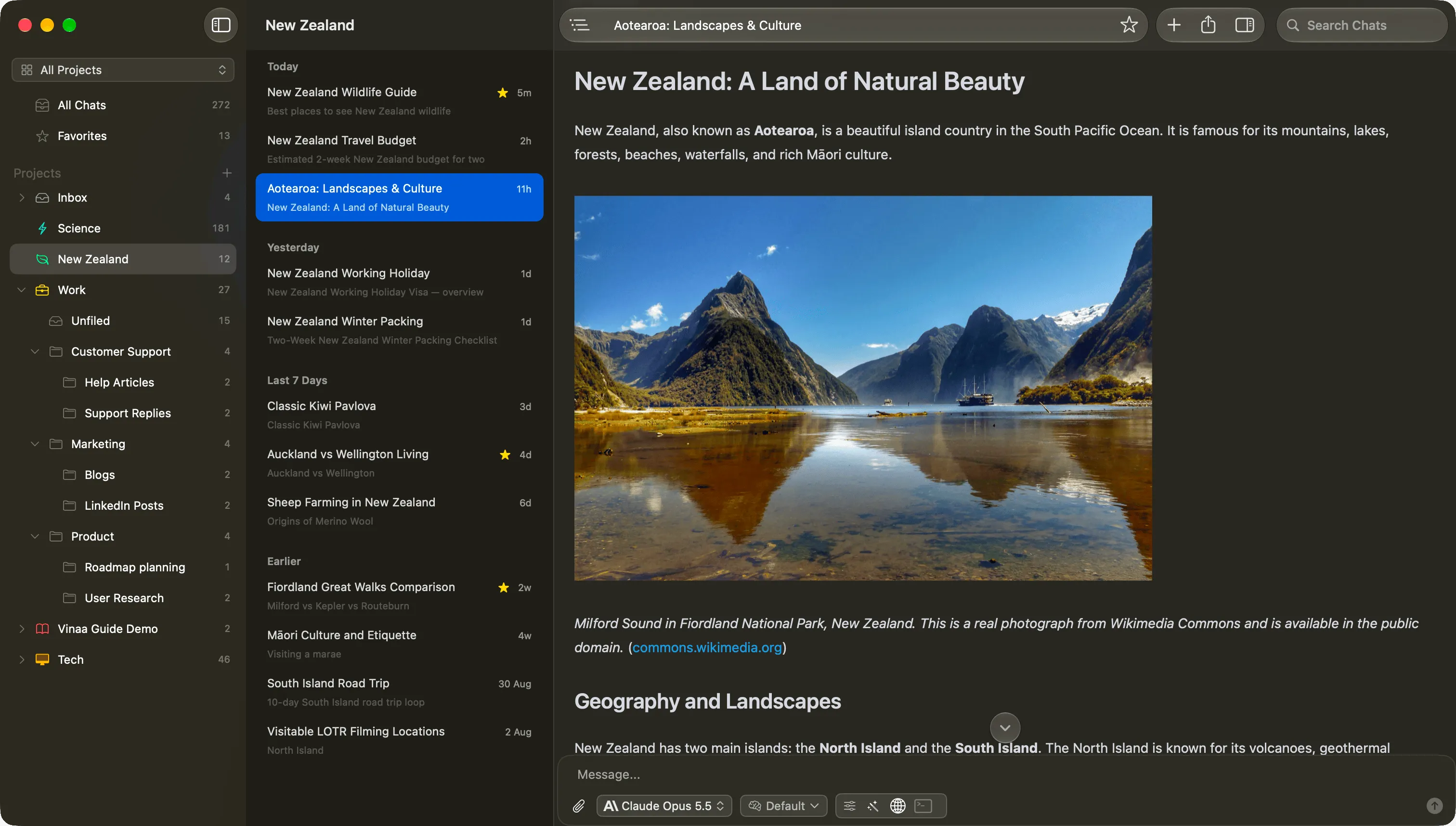
The Vinaa window with a project’s chats in the sidebar and a chat open
  • Vinaa 1.0. Vinaa is out of beta. Thank you to everyone who tested it and sent feedback.
  • See who made each model. Models from OpenRouter, other gateways and local servers show their maker’s icon, and the model picker’s ”/” filter has a new “Made by” section.
  • Sync status opens Sync settings. Click the sync status in the sidebar to go straight to Settings → Sync.
  • Backup progress. Export All Data shows its progress, then the saved file with Show in Finder.
  • Connections that need setup. A connection whose API key isn’t on this Mac is marked “Setup required”, and its models are dimmed in the model picker.
  • PDF table of contents. Exported PDFs now have a table of contents.
  • Fixes
    • Claude plan chats no longer fail after Vinaa has been idle.
    • Using MCP tools no longer briefly freezes the app.
    • A message that fails right away no longer leaves the chat blank.
    • The model picker no longer shows an empty list when you type straight after opening it.
    • Failed MCP tool calls show as failed, with a clearer message when a server can’t be reached.
    • A chat whose first message failed now gets a title once a later message succeeds.
    • Pasting a copied screenshot attaches it.

If you tested the beta, your Mac gets a new 14-day trial starting from the 1.0 release. If you already have a license, nothing changes.

  • New
  • Fixed

MCP servers on your Mac

MCP servers on your Mac. Custom MCP servers can now use an http://localhost or http://127.0.0.1 address, so a server running on your Mac can connect. Other addresses still need HTTPS.

Fixes
  • Security improvements for Claude plan chats.
  • New
  • Fixed

Use your Claude plan, and Vinaa in 9 more languages

  • Vinaa in your language. Now in German, Japanese, French, Simplified and Traditional Chinese, Spanish, Brazilian Portuguese, Korean and Italian. Choose a language in Settings → Appearance.
  • Use your Claude plan (experimental). Chat with Claude through your Claude Pro, Max or Team plan.
  • Archived Projects. Archived projects move to their own view, out of Switch Project.
  • Claude import. Imports Claude’s new export format.

Fixes

  • Export as Markdown or PDF now exports the whole chat.
  • Changing a chat’s model keeps its reasoning setting.
  • ⌘D now removes a favorite as well as adding one.
  • Deleting a connection no longer moves its chats to the top of the Chat List.
  • Text and PDF attachment previews show the top of the page.
  • New Folder from Move to Folder no longer creates two folders.
  • Prompts typed with curly quotes now work.
  • A link cited twice in one answer keeps the same source number.
  • New
  • Improved
  • Fixed

Full-text search

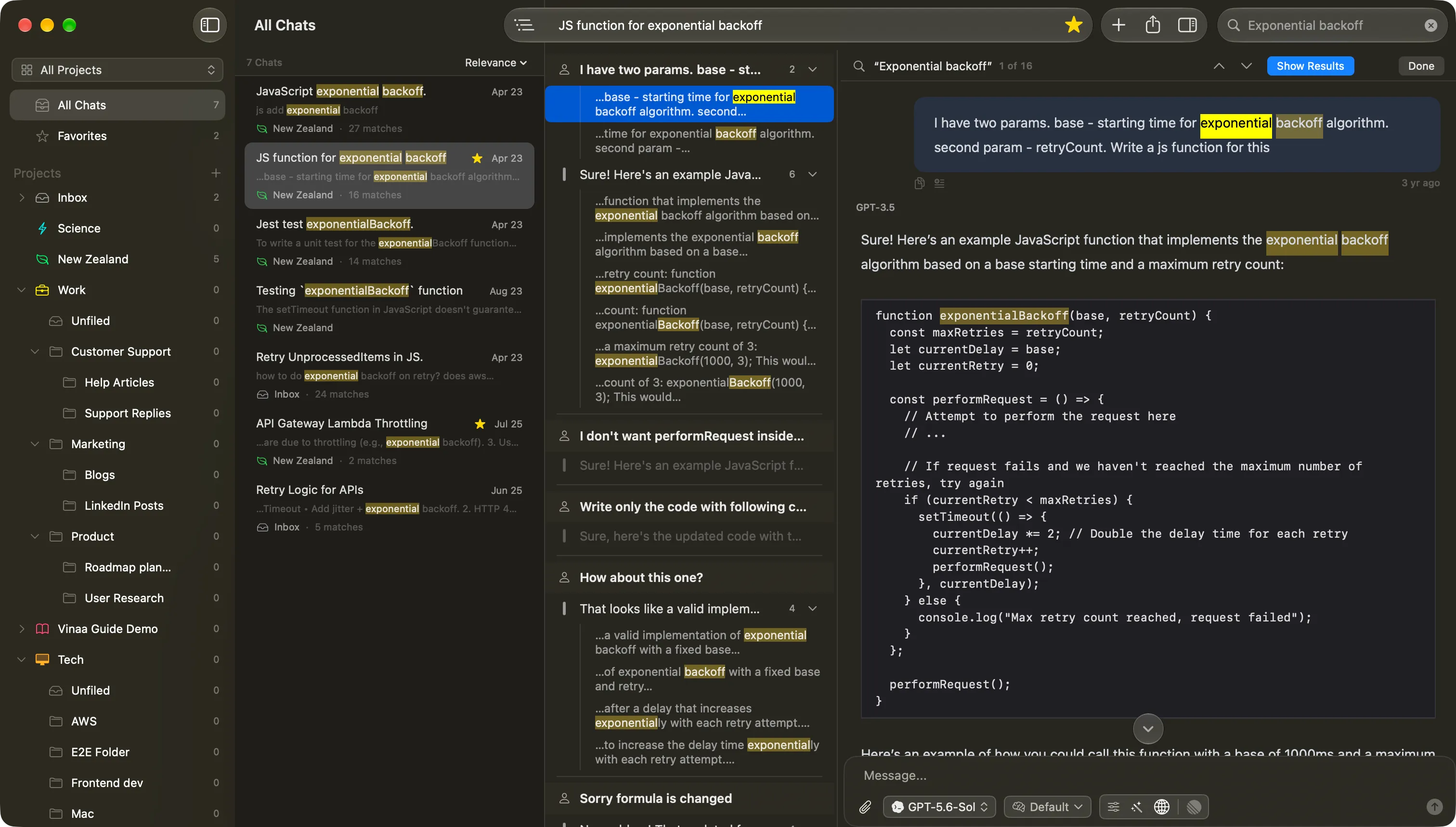
Full-text search in Vinaa, with matching chats and messages highlighted
  • Full-text search. Press ⌥⌘F to search the text of every message in every chat, not just chat titles.
    • Type a few words to find the messages that contain all of them, in any order. Put words in quotes to find that exact phrase.
    • Click a result to open the chat at the matching message. Use the arrows to move between matches, or press ⌘F to see them all in Find in Chat.
  • Tidier replies. When the AI thinks or uses tools, those steps now fold into one line that shows what it’s doing right now. When it’s done, the line shows a short summary, and you can click it to see each step.
  • Long messages. A long message you sent shows its first few lines with Show More. Line breaks in messages you paste are now kept.
  • New providers. Moonshot AI (Kimi), Z.ai (GLM), Alibaba Cloud (Qwen) and Baseten. On macOS 27, Apple Foundation Models runs Apple’s on-device model for free, with no API key.
  • Redesigned Connections settings. Adding a connection now walks you through it in steps: choose a provider, set it up, then pick your models. All providers share one model list, which shows prices and lets you star and filter models. Each connection has one page with its models, an Edit… button and Delete at the bottom. MCP Servers, Prompts and License follow the same layout.
  • Source numbers in answers. When an answer cites its sources, numbered links like [1] show in the text and match the sources list below it.
  • Max reasoning on more models. The Max reasoning setting now works the same way across OpenAI, Anthropic, Google, xAI, DeepSeek and Mistral models.
  • Fixes
    • Long chats no longer stop with an “HTTP 400” error as they get close to the model’s limit.
    • OpenRouter’s Auto Router and Kimi models no longer fail on every message.
    • LM Studio chats now fit the context size the model is loaded with.
    • Error messages show the provider’s own reason. You can select or copy them, and Report a Problem includes them.
    • When a provider’s free plan doesn’t allow a feature (for example, Gemini with Google Search), Vinaa shows Google’s message instead of retrying.
    • Long chats scroll smoothly, even while a response is streaming.
    • Vinaa no longer freezes at launch when you have many connections.
  • New
  • Improved
  • Fixed

Vinaa 0.1.8

  • All your projects in one sidebar. The sidebar now shows every project at once, with their folders and chats.
    • Focus on one project. Choose a project at the top of the sidebar (⇧⌘P) to show only its folders and chats in that window. Other windows keep their own choice.
    • Go to Project or Folder. Press ⌥⌘O and type to jump to any project or folder.
    • Show in. Right-click a chat and choose Show in to jump to its project or folder.
    • Reorder projects. Drag projects into the order you like, or use Move Up / Move Down (⌥⌘↑ / ⌥⌘↓).
  • Archive projects. Archive a project to hide it and its chats; unarchive it any time.
  • Find in Chat. Press ⌘F to search the whole conversation, step through matches with ⌘G / ⇧⌘G, and turn on Show Results to see every match in the sidebar.
  • Text Size. Make text bigger or smaller everywhere with ⌘+ and ⌘−, and reset it with ⌘0 (View menu).
  • Buy licenses for more Macs. Settings → License → Add More Macs opens your license on vinaa.ai, where you can see the Macs using it and buy more.
  • Bug fixes and performance improvements.
  • New
  • Improved
  • Fixed

OpenRouter, OpenAI-Compatible API and more providers

New

  • OpenRouter. Connect your OpenRouter account to use hundreds of models, with web search. Use Edit Models to choose which of them show up in your model list.
  • More providers. Native support for Groq, Together AI, Fireworks AI, Cerebras and DeepInfra.
  • Custom connections. Add any OpenAI-compatible API by its URL and key.
  • Ollama Cloud. Ollama and LM Studio connections now accept an optional API key, so you can use Ollama Cloud and secured local servers.

Improved

  • Calmer streaming. Replies no longer scroll away while you read; turn following back on in Settings → Appearance. Thinking blocks remember whether you keep them expanded or collapsed.

Fixed

  • Fixes. Failed replies retry at most twice, Quick Look shows attachment names, Open Tools Panel is disabled when there are no tools, plus layout fixes for macOS 27.
  • New
  • Improved

A rebuilt, more powerful agent

  • A rebuilt, more powerful agent. We rebuilt the engine behind every chat from the ground up. It handles longer, multi-step tasks, recovers on its own when something goes wrong, and works more reliably with every provider.
  • Clearer errors. When something goes wrong, you’ll see what happened right where it happened, and you’ll always know when Vinaa is still working on a reply.
  • Report a Problem. Send a private report from an error card or the Help menu. You preview exactly what’s sent, and it never includes your conversations.
  • Max Tool Steps. Choose how many tool steps the agent may take in a turn (Settings → Defaults).
  • Smarter tool use in Auto mode. The agent searches your connected tools and turns on the ones it needs.
  • Faster, cheaper long chats. Prompt caching cuts the cost of long chats, and Claude clears old tool results in long runs so it stays within its context window.
  • Reasoning and effort. Thinking and effort settings now follow each model’s real capabilities. Reasoning from local models (LM Studio, Ollama) now shows as thinking.
  • Code execution. With Claude, code execution keeps its workspace across steps and turns, and files it generates are saved as attachments.
  • Miscellaneous fixes and improvements.

Import chat improvements

  • ChatGPT imports work again after a recent export format change. Both older and newer exports are now supported.
  • Improved support for large Claude exports.
  • Unreadable files are now skipped without stopping the entire import.
  • Recent ChatGPT exports no longer include web searches or generated images, so these can’t be imported.

Vinaa is free during the beta

Free during the beta

Vinaa is now free to use while it’s in beta. No trial to start, no license required.

Beta pricing

Vinaa Lifetime is heavily discounted during the beta. Once beta ends, that price is gone.

Expand and collapse headings

In the Section Jumper, each heading with sub-headings now opens on its own, click the chevron, or use the right and left arrow keys.

Fixes and improvements.

New authentication options for MCP servers

More ways to connect MCP servers

When adding an MCP server, you can now authenticate with custom HTTP headers (e.g. a personal access token) or static OAuth (client ID, secret, and scopes).

Codex models

Codex models are now fetched from the ChatGPT catalog, so the list stays up to date.

Fixes & improvements

  • More reliable OAuth connections and a clearer header add/edit dialog.
  • Opening a chat in a new tab no longer flashes and keeps your column layout and scroll position.

Welcome to the Vinaa beta 👋

Vinaa is now available in beta.

This first release is the beginning of a native, private, and user friendly AI workspace for your Mac. Keep conversations, projects, files, and models together in one place, with support for your own API keys and local models.

As this is an early beta, you may run into rough edges. Your feedback will help shape what Vinaa becomes next.

  • Ask questions in the Discord community
  • Share bugs, feature requests, and product ideas on the feedback board
  • Check this page for updates as Vinaa improves

Thank you for being one of the first people to try Vinaa.