
Fluent alternative for Mac
Vinaa vs Fluent:A chat app or an assistant in every Mac app?
Choose a cloud or local model, start chatting, and keep every conversation organized in Vinaa. Fluent brings AI into the app you are already using. The choice comes down to where you want to use AI and what you want to do with your saved chats.
By Sujeevan Nagarajah, Vinaa's developer
Updated November 2, 2026 · Fluent research November 1, 2026
The short answer
Choose based on today’s tasks.
Vinaa
For everyday AI chat you come back to
Chat with cloud and local models, switch models within a conversation, and keep chats in projects and nested folders. Find earlier answers, reuse prompts, connect tools, and optionally sync through your private iCloud account.
Fluent
For help inside other Mac apps
Rewrite selected text in place, dictate, use Computer Use, and schedule actions or background teammates. Fluent offers more automation across the Mac today, alongside a full Chat UI.
I build Vinaa. Fluent details come from its official website and documentation, checked November 1, 2026. I have also tried Fluent 2.3.1, though I do not use it day to day. My UX comments are personal impressions, not a structured review or benchmark.
01 · User experience
Where do you want AI to live?
Vinaa: a chat workspace for everyday AI
Vinaa is built around everyday conversations with cloud and local AI models. Projects, folders, and search help keep those conversations easy to find and continue.
Vinaa's priority is to make new capabilities fit naturally into that workspace. A quick AI panel for working in other apps, screen awareness, app context, Computer Use, and voice input are planned.
Fluent: AI inside other Mac apps
Fluent's Smart Panel uses selected text and context from the app, then inserts results or replaces text in place. Dictation, Computer Use, and scheduled teammates extend that assistance across the Mac.**
In hands-on use (version 2.3.1), Fluent's full chat window offers less for extended conversations than Vinaa's; Fluent's focus remains its quick panel. This impression comes from Vinaa's developer, not a comparative benchmark.
The practical difference: Fluent leads with quick AI inside other apps; Vinaa leads with a chat workspace people return to. The two will overlap as Vinaa adds its planned quick AI panel.
02 · AI chat and models
How will you use different AI models?
Vinaa: cloud and local chat with project defaults
Vinaa supports major cloud providers, OpenRouter, custom connections, and local models through Ollama or LM Studio. Apple Foundation Models run on-device on macOS 27 without an API key.
The model can be switched during a conversation. Project defaults keep the model, system prompt, and tools consistent across related chats. Vinaa also supports an existing ChatGPT plan or Claude plan (experimental).
Fluent: model choice with Council
Fluent supports cloud providers, custom connections, Ollama, and LM Studio, plus in-app MLX downloads and Apple Intelligence on macOS 26. The model can be switched during a chat.*
Fluent can connect to existing ChatGPT, Claude, GitHub Copilot, and Google AI plans, subject to their limits.*
Council combines answers from several models with blind peer review and a final verdict. Vinaa does not offer Council.*
The practical difference: Both support cloud and local chat. Vinaa adds project defaults; Fluent adds Council and more existing-plan connections.
03 · Organizing and finding chats
Can you find the answer again next week?
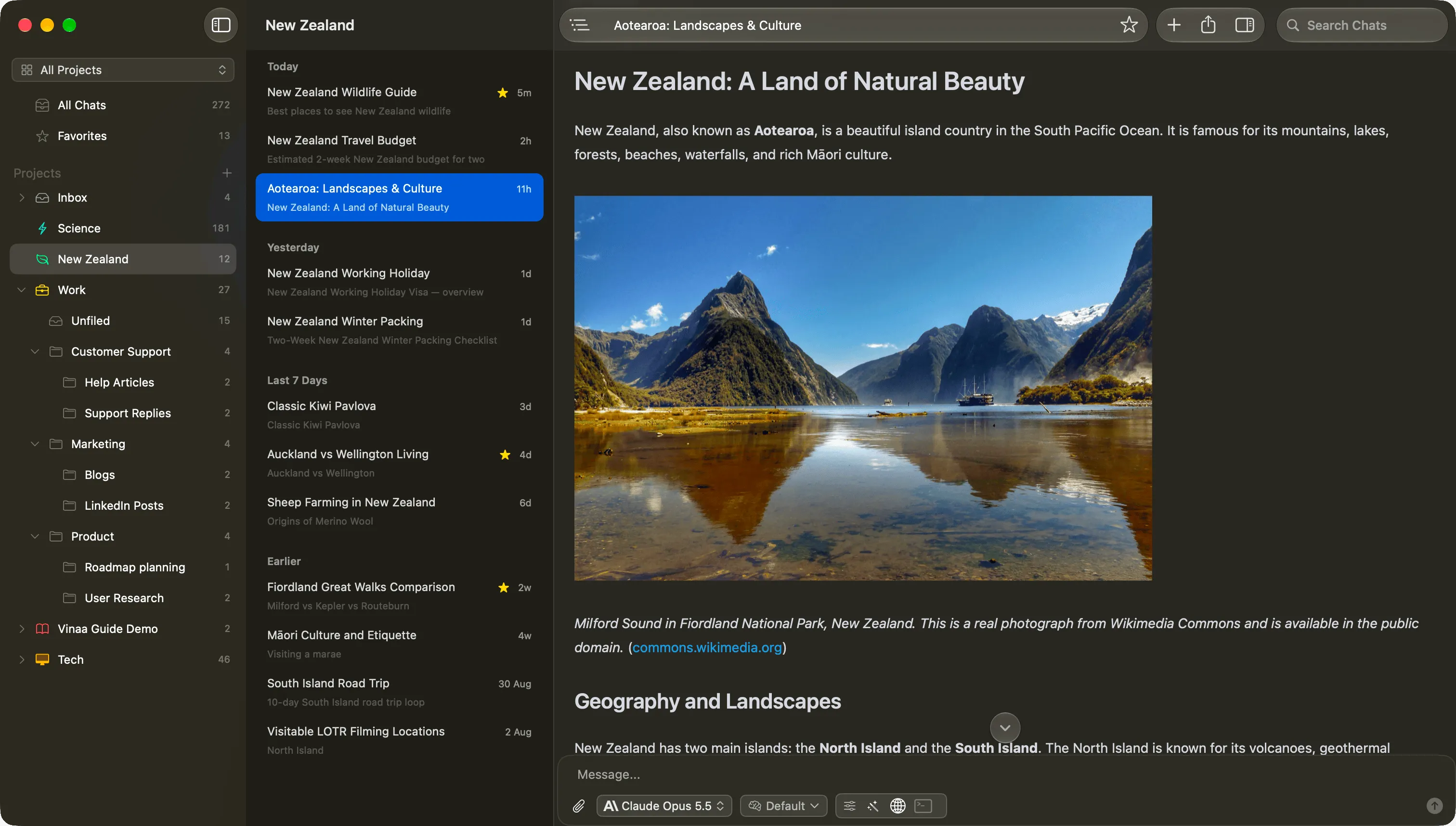
Vinaa: projects, folders, and answer headings
Projects, nested folders, automatic filing, favorites, and unread status keep related chats together. Search covers the full text of every message and works within individual conversations too.
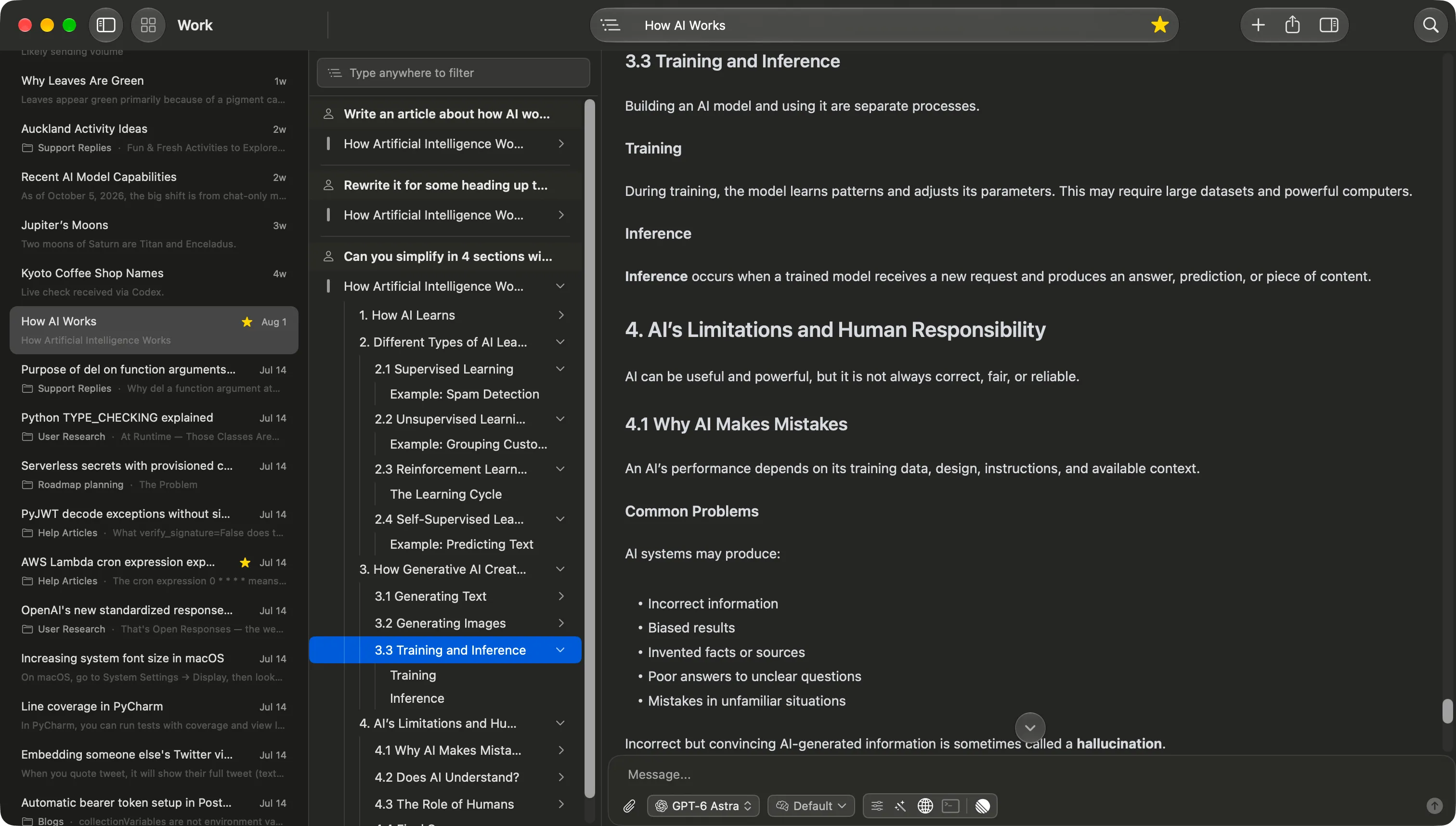
Content Navigation makes prompts, responses, and headings easy to find inside long answers. Multiple full chat windows and tabs make it possible to read conversations side by side.
Fluent: date groups, pinned chats, and branches
Chats are grouped by date, with pinned chats at the top. Search covers chat names and messages, and conversations can branch from an earlier message.*
There are no folders or projects for organizing chats, and no heading outline inside answers. Tabs are for Smart Panel requests; the full Chat UI uses one window.*
The practical difference: Both search saved messages. Vinaa’s projects, nested folders, and automatic filing help keep chats organized, while heading navigation helps find a specific part of a long answer.
04 · Tools, MCP, and automation
How much should AI do across your Mac?
Vinaa: tools and MCP within chat
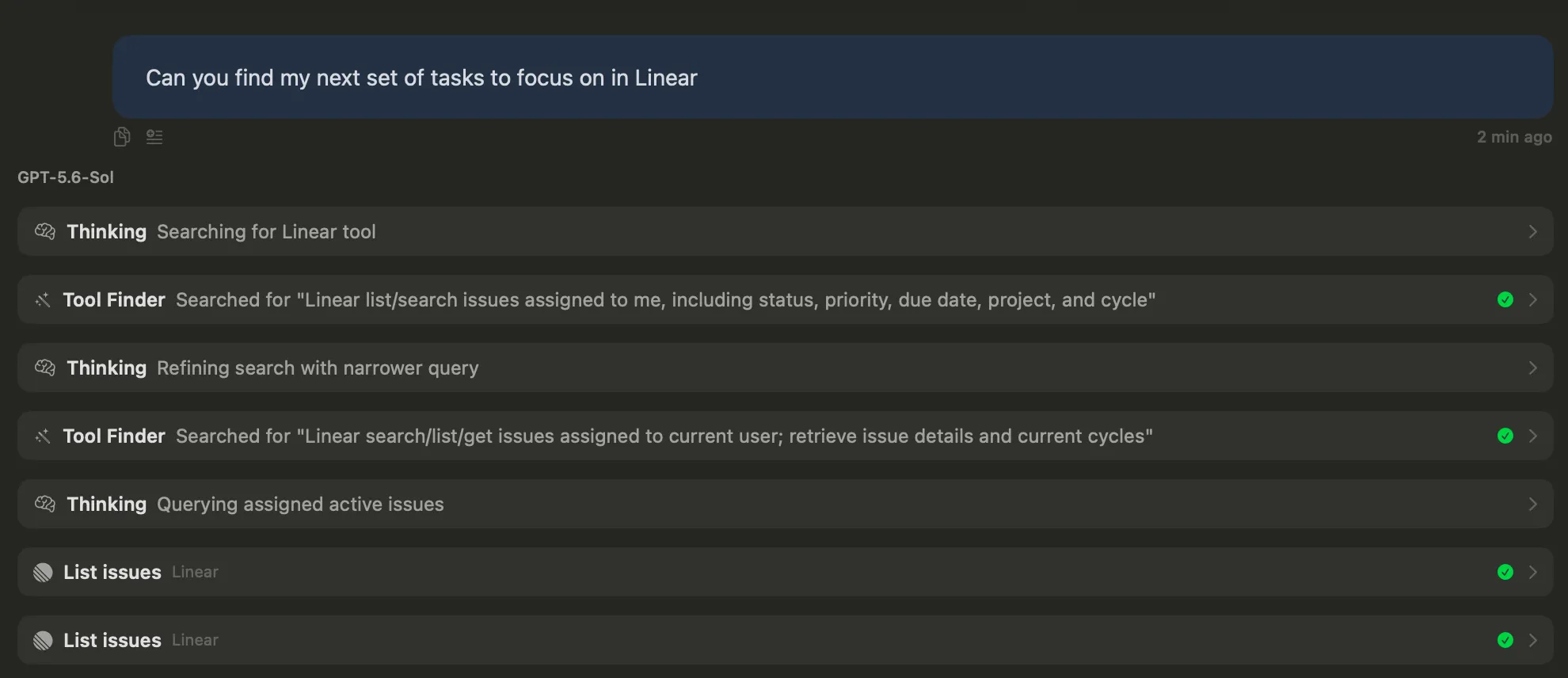
Provider tools and remote MCP servers bring web research and other tasks into conversations. Tool Finder selects relevant tools, with defaults for each chat or project.
The Prompt Library stores reusable prompts with input fields. Files can be attached and reused from earlier chats.
Planned: a quick AI panel for working in other apps (including replacing selected text), Computer Use, local MCP, and folder-based workflows. Scheduled tasks are not available.
Fluent: tools and automation across the Mac
Fluent offers built-in Mac integrations and connections to local or remote MCP servers. MCP remains an early-stage feature.**
Saved Actions support reusable prompts and scheduled tasks that can wake the Mac. Computer Use, Finder file moves, and background teammates are available today.**
Memory uses files and folders as a knowledge base. Vinaa's folders organize chats; memory across chats is planned.*
The practical difference: Both can use tools and MCP servers. Fluent does more today with local MCP, built-in Mac integrations, and scheduled or on-screen actions. Choose it if those are requirements now.
05 · Privacy, history, and moving Macs
Where will your chats be when you change Macs?
Vinaa: local chats with optional private iCloud sync
Vinaa stores chats locally and API keys in Keychain. Optional sync uses the user's private iCloud account; Vinaa does not run a chat-storage server.
You can import your existing ChatGPT and Claude conversations and continue them with any model. Chats can be exported as Markdown or PDF.*
Fluent: encrypted history tied to one Mac
Chat history is encrypted locally with a Keychain key. API keys also live in Keychain; no account or telemetry is required. The Memory database is unencrypted; FileVault is recommended.*
Exported history can be restored on the original Mac but cannot move chats to another Mac. Import replaces that Mac's history. No history sync is available in the documented workflow or the inspected app.*
Accessibility permission supports reading context and inserting results in other apps. Computer Use and teammates use Screen Recording permission.*
The practical difference: Vinaa supports continuing chats on another Mac. Fluent supports restoring local history on the original Mac.
Even with local chat storage, requests to cloud models leave the Mac. The model provider or tool still receives content needed for the task. API requests go directly to providers; Fluent subscription connections run through the provider’s app on the Mac.*
06 · Pricing
What does each app cost?
Vinaa: one payment and all future updates
$30 for one Mac, $39 for two, or $55 for three during the Black Friday sale, through November 30, 2026. All include future updates with no subscription. Refunds are available within 30 days. See current Vinaa pricing and terms.
Fluent: lifetime upgrades or one year of updates
Basic is $49 for one Mac with lifetime upgrades. Basic 1-year is $29 for versions released over 12 months; the app keeps working afterward. Standard is $69 for two Macs, and Team starts at three licenses for $29 each.*
The practical difference: Vinaa is $9 cheaper for one Mac with lifetime updates. Fluent is $1 cheaper for two Macs and $13 cheaper for three. Fluent’s $29 1-year option has the lowest upfront price.
Prices checked November 1, 2026
| Option | Price | What is included |
|---|---|---|
| Vinaa Lifetime | $30 / $39 / $55 once (was $40 / $70 / $100) | 1 / 2 / 3 Macs respectively. Black Friday sale through November 30, 2026; $99 / $129 / $159 from December 1, 2026. One payment includes every future app update. |
| Fluent Basic | $49 once | 1 Mac; lifetime upgrades. |
| Fluent Basic 1-year | $29 once | 1 Mac; 12 months of versions. App keeps working afterward. |
| Fluent Standard | $69 once | 2 Macs; lifetime upgrades. |
| Fluent Team | $29 per license from 3 Macs; $87 for 3 | Lifetime upgrades. |
In both apps, paid model usage is billed separately from the app license or can count toward an existing ChatGPT or Claude plan through Codex or Claude Code. Local models are also supported. The total cost includes both the app license and model usage.
Where Vinaa is headed
Vinaa is a new app, and today's gaps are not permanent: Vinaa plans to add a quick AI panel for working in other apps, including replacing selected text, screen awareness, app context, Computer Use, voice input, memory across chats, local MCP, folder-based workflows, and image generation. These features are Planned, not available yet, and no release dates are promised. Follow the Vinaa roadmap for updates.
Which should you choose?
Pick the experience you will use every day.
Vinaa is the better fit when
- You want a full chat workspace for cloud and local models, not just a quick panel.
- You want projects and nested folders to keep chats organized, with headings to move through long answers.
- You want several chats open at once in full windows and tabs.
- You want to continue your chats on another Mac with private iCloud sync.
Fluent is the better fit when
- You need text replacement or dictation inside other apps today; Vinaa plans a quick AI panel and voice input.
- You need Computer Use, scheduled actions, or background teammates today.
- You want local MCP, built-in integrations, Memory, or Council.
- You prefer in-app MLX downloads or connections to a wider range of AI plans.
Side by side
Compare the features that matter to you.
| What matters | Vinaa | Fluent |
|---|---|---|
| Main focus | A chat workspace for cloud and local AI models, all in one place | AI inside other apps, chat, and automation |
| Chat windows and tabs | Multiple full chat windows and tabs | One chat window; tabs for Smart Panel requests |
| Providers and model switching | Cloud and local models; switch mid-chat; project defaults | Cloud and local models; switch mid-chat |
| Existing AI plans | ChatGPT plan; Claude plan (experimental) | ChatGPT, Claude, Copilot, Google AI plans |
| Local models | Ollama, LM Studio; Apple Foundation Models on macOS 27 | Ollama, LM Studio; Apple Intelligence on macOS 26; in-app MLX downloads |
| Chat organization | Projects, nested folders, automatic filing, favorites, unread, archives | Date groups and pinned chats; no folders or projects |
| Search and navigation | Full-text and in-chat search; prompt, response, and heading navigation | Search chat names and messages; branch conversations |
| History and API keys | Local chats; keys in Keychain | Encrypted local history; keys in Keychain |
| Sync and imports | Optional private iCloud sync; ChatGPT and Claude imports | No history sync; history restore on the same Mac |
| Files and reusable prompts | File attachments and reuse; Prompt Library with input fields | File attachments; reusable Actions with variables |
| Remote and local MCP | Remote MCP; local MCP Planned | Local and remote MCP servers |
| Tools and integrations | Provider tools, Tool Finder, chat and project defaults | Built-in Mac integrations and MCP |
| App context and screen awareness | Planned | Available |
| Computer Use | Planned | Available; background teammates too |
| Voice input | Planned | On-device dictation in 40+ languages |
| Quick panel and in-place text replacement | Planned: quick AI panel including selected-text replacement | Available in Smart Panel |
| Scheduled tasks and folder workflows | Scheduled tasks Not available; folder-based workflows Planned | Scheduled Actions; Finder file moves |
| Memory across chats | Planned | Memory with file and folder knowledge base; unencrypted database |
| Multi-model Council and desktop pet | Not available | Available |
| Meeting recording / meeting AI | Not planned | Not assessed in this comparison |
| iPhone app | Planned | Not assessed in this comparison |
| Image generation | Planned | Google-generated images |
| App payment and updates | One payment; all future updates | Lifetime or 1-year update options; app keeps working |
Updated November 2, 2026; Fluent research November 1, 2026. Planned means not available yet, with no release date promised. Not planned and Not available are separate statuses. See the Vinaa roadmap. Fluent feature descriptions reflect its documentation; the UX section also includes the hands-on impression from Vinaa’s developer, described above. Scroll sideways on smaller screens.
Sources, disclosure, and updates
Vinaa publishes this comparison and is not affiliated with Fluent or Epic Bits. Vinaa's developer tried Fluent 2.3.1 but does not use it day to day. The UX section includes that hands-on impression, not a structured review or comparative benchmark. Feature descriptions reflect documented or advertised behavior, not independently measured results.
Fluent sources researched November 1, 2026: official overview, Chat UI, Smart Panel, models and providers, Actions, MCP, history, privacy principles, permissions, pricing, and changelog. Its September and October releases brought Memory changes, subscription providers, Computer Use, the desktop pet, and Team in quick succession. Fluent is changing quickly.
Vinaa details reflect its verified features as of November 1, 2026; see the feature walkthroughs. All screenshots show Vinaa. This comparison is reviewed from time to time as features, prices, and availability change.
Also compare Vinaa vs Alter, Vinaa vs BoltAI, and Vinaa vs Raycast AI.